

If you’ve decided to stop using ChatGPT and want to permanently delete your account, OpenAI makes it simple, but once deleted, all your data, chat history, and custom GPTs will be permanently erased.
Let’s go step-by-step through how to delete your ChatGPT account, and what happens afterward.
What Happens When You Delete Your ChatGPT Account
When you delete your ChatGPT account, several actions take place. All your chat history and conversations will be permanently deleted from the system. Additionally, any associated data, including your API keys, saved GPTs, and usage data, will be removed. If you have an active subscription, such as ChatGPT Plus or Go, you will immediately lose access to it. It is crucial to remember that this action is irreversible; you cannot recover your account once the deletion process is complete.
How to Delete Your ChatGPT Account
Follow these simple steps to delete your ChatGPT account directly from your browser or app:
- Go to ChatGPT and log in to your account.
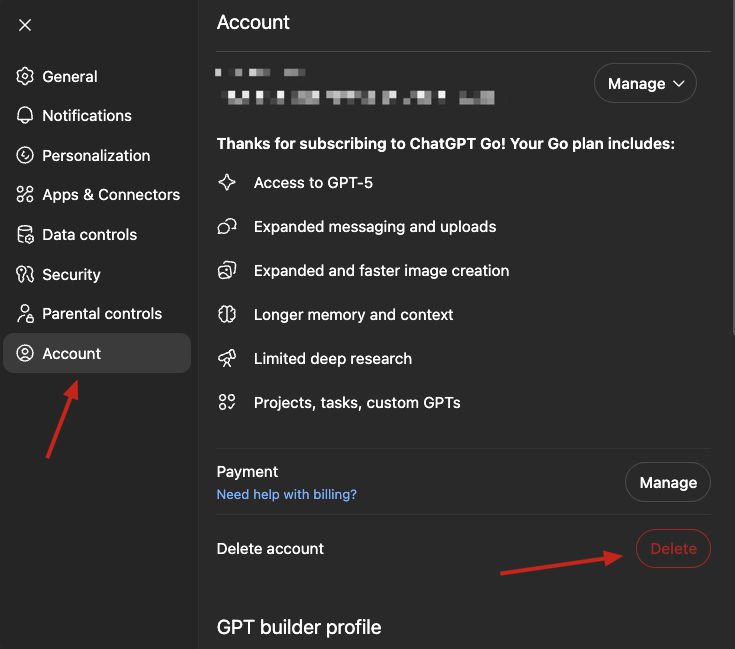
- Click on your profile name or Settings (⚙️ icon) in the bottom left corner.
- Select Settings → Account from the sidebar.
- Scroll down and click the red “Delete account” button.
- Type DELETE in all capital letters on the confirmation screen.
- Click Confirm Deletion to permanently remove your account.
💡 Tip: If you are on a paid plan (ChatGPT Go or Plus), make sure you cancel your subscription before deletion to avoid auto-renewal charges.
Also Read: How to Get a Sora 2 Invite Code (Updated Invite Codes Inside)
How to Delete ChatGPT Account Without Login
If you can’t log in to your account or have lost access to your login credentials, you can request account deletion via email.
Here’s how:
- Open your registered email address (the one used for ChatGPT).
- Compose a new email to: [email protected]
- Use this subject line:
👉 Request to Delete My ChatGPT Account - Write the following prompt in the email body:
Hello OpenAI Team, I would like to permanently delete my ChatGPT account associated with this email address. Please confirm once my account and all associated data are deleted. Thank you.Once sent, OpenAI will typically process your request within a few business days. You’ll receive a confirmation email once your account is deleted.
Also Read: Fix ChatGPT Enter Button Not Working (Updated 2025 Guide)
Will Deleting My ChatGPT Account Delete Chat History?
Yes. When you delete your ChatGPT account, all your saved conversations, chat history, and custom GPT data are permanently removed from OpenAI’s systems.
However, deletion is irreversible, once deleted, there’s no way to recover your messages or account.
FAQ
1. If I delete my ChatGPT account, will my data be deleted?
Yes. Deleting your ChatGPT account permanently removes your personal data, chat history, and any custom GPTs linked to your account.
2. Can I recover my ChatGPT account after deleting it?
No. Once your ChatGPT account is deleted, it cannot be recovered. You will need to create a new account if you want to use ChatGPT again.
3. I can’t delete my ChatGPT account, what should I do?
If you’re having trouble deleting your account:
- Try logging in again within 10 minutes after starting the deletion process.
- Ensure that you type “DELETE” in all caps when asked for confirmation.
- If the issue continues, send an email to [email protected] with your account details and request.
4. Will deleting my ChatGPT account stop my subscription?
Yes. If you delete your ChatGPT account, your Go or Plus subscription will automatically be canceled. But to avoid charges, it’s best to cancel your plan first from your account’s “Manage Plan” section.
Deleting your ChatGPT account is simple, but it’s also permanent. If you just want to take a break, consider logging out or disabling chat history instead. However, if you’re sure, follow the steps above: or send an email to [email protected] to have your data wiped completely.