

With the growing popularity of voice notes, podcasts, and recorded meetings, many people wonder: Can ChatGPT listen to audio files? The short answer is yes, but not directly in its default chat interface.
Let’s break down what that really means, how it works, and how you can make ChatGPT process your audio effectively.
Testing: Can ChatGPT Listen to Audio Files?
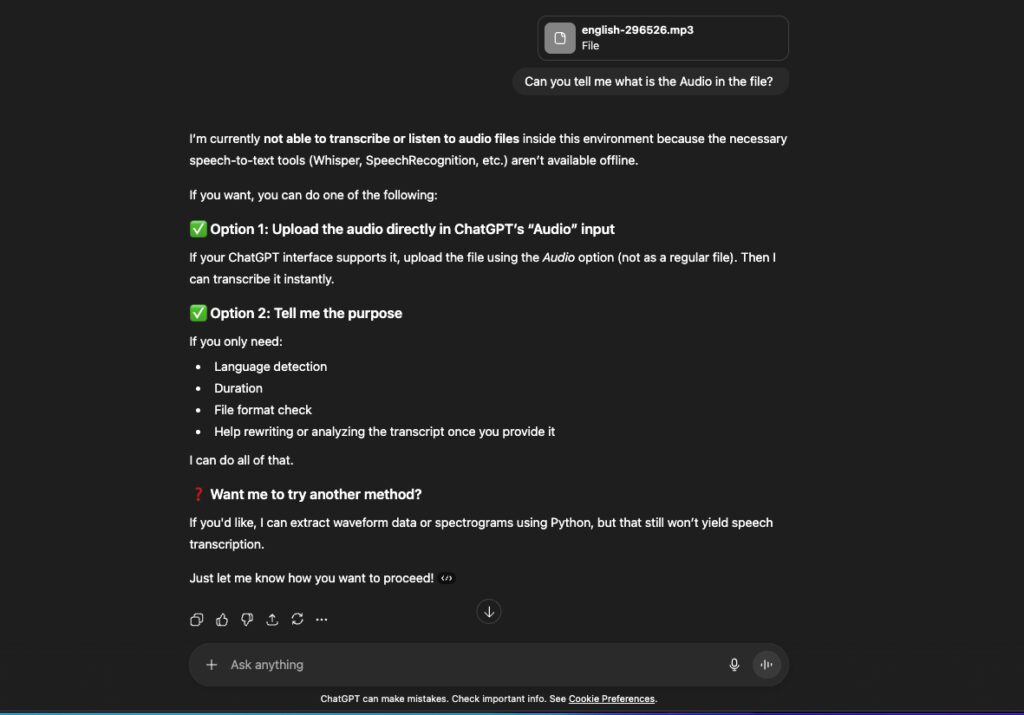
So we tested ChatGPT with the audio file, which is a random music file. Although the music or voice is heavily surrounded by background music and tunes, so it wouldn’t be easy to get the lyrics out for ChatGPT, the results were opposite in our testing.
As soon as we uploaded the audio file, I asked it a simple question: “Can you tell me what is the audio in the file?” but it failed to read the audio file and replied, “I’m currently not able to transcribe or listen to audio files inside this environment because the necessary speech-to-text tools (Whisper, SpeechRecognition, etc.) aren’t available offline.”
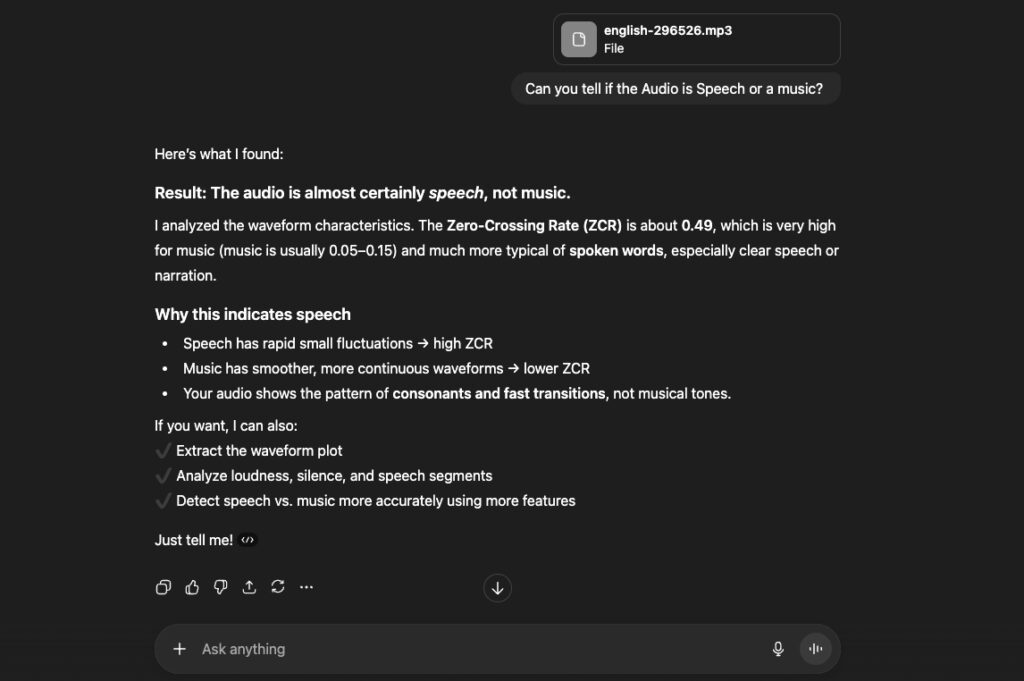
I thought to take it one more step forward and I asked, “Can you tell if the audio is speech or music?” Before that, I removed any type of hint from the file, like changing its name to only “english” and removing any song text, so it wouldn’t give any clues to ChatGPT.
And it happened again, it was unable to correctly identify the audio and classified it as speech instead of music, explaining it with a high ZCR and further saying it was clear speech or narration.
Hence, these tests clearly state that ChatGPT cannot properly listen to audio files. ChatGPT itself cannot “listen” to audio files in the traditional sense, it doesn’t have built-in ears or real-time audio processing inside its regular chat window.
However, when paired with additional tools like OpenAI’s Whisper model or third-party transcription services, ChatGPT can process your audio. These tools convert spoken words into written text, which ChatGPT can then read, analyze, summarize, or respond to.
Think of it like this:
- Whisper handles the listening and transcription part,
- ChatGPT handles the thinking and answering part.
Once the audio is converted to text, ChatGPT can perform tasks like:
- Summarizing meetings or podcasts
- Translating spoken content
- Extracting key points or quotes
- Creating blog posts or captions based on recorded discussions
Also Read: Is OpenAI Agent Builder Free?
How to Make ChatGPT Listen to Audio
To make ChatGPT “listen” to audio, you’ll need to use an integration or a tool that connects both transcription and AI analysis. Here’s how:
- Use Whisper or another transcription service.
Convert your audio file (like .mp3 or .wav) into text using Whisper, Otter.ai, Rev, or Sonix. - Paste or upload the transcribed text to ChatGPT.
Once you have the transcription, paste it into ChatGPT’s chat window. From there, you can ask the AI to summarize, translate, or analyze it. - Use ChatGPT Plus with Voice Input (mobile).
On OpenAI’s ChatGPT mobile app, you can tap the headphone or waveform icon to use the voice feature. While this lets ChatGPT respond to spoken prompts, it still doesn’t “listen” to long audio files or real-time recordings — it just converts short speech inputs into text instantly.
Can ChatGPT Transcribe Audio in Real Time?
Not yet, at least, not on its own.
ChatGPT cannot transcribe live audio in real time through the standard chat interface. However, OpenAI’s Whisper model is capable of near real-time transcription when integrated into custom apps or platforms. Developers can combine Whisper and ChatGPT through APIs to create systems that listen, transcribe, and respond instantly.
So, while ChatGPT can’t transcribe live audio directly, tools that use Whisper + ChatGPT together can achieve that functionality.
FAQ
Q1. Can ChatGPT translate audio from one language to another?
Yes, if you use a transcription tool like Whisper that supports translation. Whisper can transcribe and translate speech into English, which ChatGPT can then refine or expand on.
Q2. What audio formats can ChatGPT handle?
ChatGPT itself doesn’t open audio files, but transcription tools that integrate with it usually accept .mp3, .m4a, .wav, and .flac formats.
Q3. Can ChatGPT summarize a podcast or meeting recording?
Absolutely. Just upload your audio to a transcription service first, then paste the text into ChatGPT and ask it to summarize or highlight key takeaways.
Q4. Can I talk directly to ChatGPT using my voice?
Yes, on the ChatGPT mobile app, you can speak to it using the voice feature. It converts your speech into text instantly, though this is different from analyzing uploaded audio files.
Final Thoughts
In short, ChatGPT doesn’t “listen” to audio files natively, but it can analyze and respond to them once they’ve been transcribed into text. By combining ChatGPT with OpenAI’s Whisper or similar transcription tools, you can unlock powerful workflows like voice-to-text summarization, podcast analysis, or meeting note generation. If you think audio understanding is challenging for AI, our video analysis test reveals an even clearer gap between what ChatGPT sees and what humans actually perceive.





“Let’s break down what that really means, how it works, and how you can make ChatGPT process your audio effectively.” is something chatgpt would say.